Learn how market, limit and stop orders differ. Compare triggers, price limits, partial fills and real execution outcomes.

Market vs. Limit vs. Stop Orders: How Execution Works
- Define the side and quantity.
- Choose speed, price control or conditional activation.
- Check the trigger source and venue protections.
- Plan for partial fills and missed exits.
- Confirm filled quantity and remaining orders.
The Academy lesson on entry and exit triggers explains when a trading condition is met. This article covers how an order behaves once submitted or activated.
A trade can have the right entry idea and still produce an unexpected result when its order is executed. A market order may fill at several prices. A limit order may never fill. A stop order may activate at your chosen level but execute somewhere else.
Market vs. limit vs. stop orders is a comparison of three different instructions. A market order seeks available liquidity now. A limit order sets the worst price you will accept. A stop order waits for a triggering condition before sending another order. Knowing which instruction you are giving the exchange helps you distinguish an entry or exit plan from an actual fill.
This guide compares the four common order forms, including stop-market and stop-limit. It also shows why some orders fill immediately, others wait and a triggered protective order may leave a position open.
Market vs. Limit vs. Stop Orders: The Basic Difference
An order tells a trading platform what you want to buy or sell, how much and under which conditions. A fill means that all or part of that order has actually traded. Submitting an order does not always produce a fill.
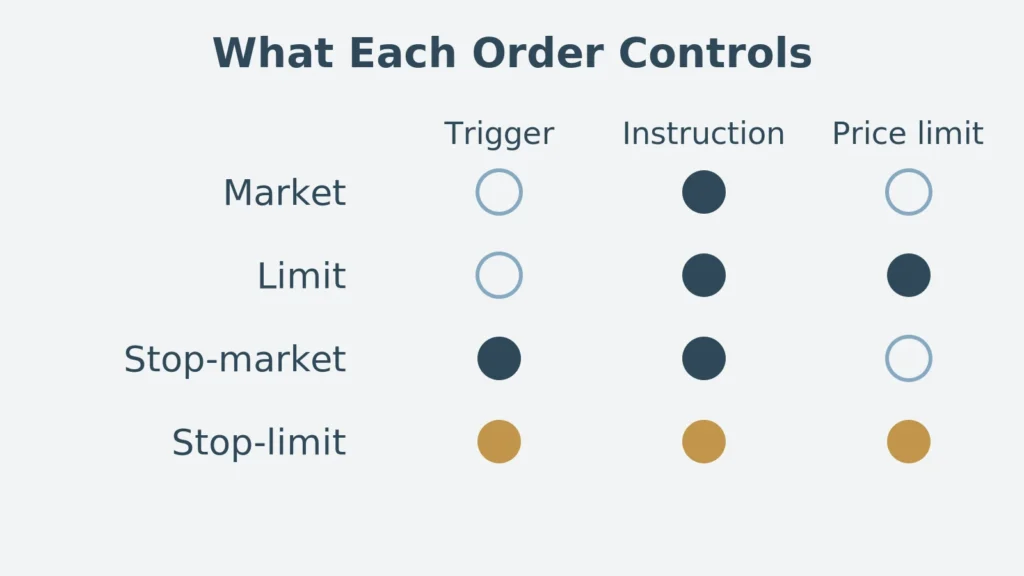
Think about three controls. Activation determines when the order can begin. The execution instruction tells the venue how to seek a trade. A price boundary limits which prices are acceptable. The familiar order types combine these controls differently.
| Order | Main instruction | Primary limitation |
|---|---|---|
| Market | Trade against available orders now | Final execution price is uncertain |
| Limit | Buy no higher or sell no lower than a set price | Some or all of the order may remain unfilled |
| Stop-market | After a trigger, submit a market order | Trigger price is not a guaranteed fill |
| Stop-limit | After a trigger, submit a limit order | The limit may prevent any fill |
These describe conventional order mechanics, not a promise from every platform. The U.S. Securities and Exchange Commission (SEC) notes that brokers may use different trigger standards. Crypto venues may add protections, price bands or contract-specific conditions.
How Does a Market Order Work?
A market order attempts to buy or sell using liquidity currently available on the other side of the market. A market buy encounters resting sell orders, called asks. A market sell encounters resting buy orders, called bids.
Imagine a hypothetical order book with two units for sale at $100.00 and three at $100.20. If that liquidity remains available, a market buy for five units could fill two units at $100.00 and three at $100.20. Total paid would be $500.60, for a weighted average of $100.12 per unit before fees. An order for fewer units might never reach the second price level.
The last traded price could be $99.95, but the buy must match available asks, not the last trade shown on a chart. The bid is an available buyer’s offered price. The ask is a seller’s offered price. The difference is the spread. The amount available at each quote matters too.
Market orders prioritize obtaining a fill, but a complete fill is not guaranteed under every circumstance. Exchange protections, insufficient liquidity, trading halts or order restrictions can lead to a partial fill or rejection. Coinbase documents market protections and possible partial execution on its Advanced Trade platform.
For a larger explanation of why an order can reach several price levels, see the order book depth guide. Here the practical lesson is simpler: an instruction to trade now is not an instruction to trade at one exact price.
How Does a Limit Order Work?
A limit order places a boundary on the execution price. For a buy, the limit is the highest permitted price. For a sell, it is the lowest permitted price. A fill may occur at a better price, but it must respect the specified boundary under the order’s rules.
Return to the illustrative sell book with two units at $100.00 and three units at $100.20. A buy limit for five units at $100.10 could fill two units at $100.00. The remaining three cannot buy from the offers at $100.20 because that exceeds the limit. If the order is allowed to rest, the unfilled quantity may wait at $100.10.
The important detail is that price control does not create liquidity. An eligible counterparty must be available. Even if a chart briefly touches a limit price, the entire order may not execute. Other orders can be ahead in the queue or the displayed volume may be too small.
A limit order is not necessarily a waiting order. For example, a buy limit at $100.30 can immediately match the available $100.00 and $100.20 asks, up to its size. This is a marketable limit order. A post-only condition instead prevents an immediate liquidity-taking fill, often by rejecting a crossing order. Coinbase describes both behaviors in its Advanced Trade documentation.
The choice is about the trade-off between a maximum acceptable price and the risk of waiting or missing the trade. It is not a choice between a good order and a bad one.
A stop price tells the venue when to activate another order. A stop-market may trade at a worse price than expected, and a stop-limit may never trade at all. Evaluate both risks before treating a protective order as a fixed loss boundary.
What Does a Stop Order Actually Trigger?
A stop order adds a condition. It waits for a specified price event and then activates another order. The trigger does not necessarily place a trade at that price.
A sell stop is commonly placed below the current market to exit a long position after adverse movement. A buy stop is commonly placed above the market to close a short or initiate a position after an upward trigger. The intended purpose does not determine how the resulting order fills.
Under a conventional stop-market instruction, reaching the trigger causes a market order to be submitted. Under a stop-limit instruction, reaching the trigger causes a limit order to be submitted. The first gives greater priority to execution once triggered. The second adds a price restriction and accepts the possibility of no fill.
A trigger can use the last traded price, a bid or ask quotation, a mark price or another product-specific reference. A chart candle touching a level does not prove that your stop triggered. The trading venue’s chosen reference and timing rules determine activation. Check the settings on the exact spot or derivatives product you use.
The Entry & Exit Triggers Academy lesson covers the trading rules that may lead to an entry or exit. This article focuses on the separate mechanics of the order submitted when that condition occurs.
Stop-Market vs. Stop-Limit: What Happens After a Fast Drop?
Suppose you hold one unit of a hypothetical asset near $100. You set a sell stop at $98.00. The market moves quickly through that level. When the order becomes active, the best executable bid is $97.00. Assume one unit is available at that bid and no relevant platform restrictions intervene.
With a stop-market sell, triggering at $98.00 sends a market sell. In this simplified scenario the order could execute at $97.00, not $98.00. The fill is $1.00 worse than the trigger. An even weaker bid could produce a larger difference.
Now consider a stop-limit sell with a stop trigger at $98.00 and a sell limit of $97.50. After activation, the order will sell only for $97.50 or higher. If all available bids are at $97.00 and none appear at $97.50 or above, it cannot fill at that moment. Depending on the time-in-force and venue rules, it may remain open or expire.
This comparison does not mean that the stop-limit is safer in every sense. It prevents an execution below its limit, but leaves the exposure open if price continues to fall. The stop-market is less restrictive about price, but it also cannot promise an exact exit or bypass trading restrictions.
All prices in this illustration are hypothetical. The example assumes the $98 stop has activated, one unit is available at the $97 bid and no exchange restriction blocks that trade. It does not predict how frequently such price gaps occur.
Why Can the Same Order Name Behave Differently Across Platforms?
Order labels are a useful starting point, but the actual product rules control execution. A conventional stop-market becomes an unrestricted market instruction after its trigger. Some crypto platforms add a price protection or slippage tolerance, which changes the chance of a complete fill.
For example, Binance’s Spot Trading documentation, updated in August 2026, describes its spot stop-market instruction as creating an order with a defined slippage tolerance after the trigger. It may execute partly and leave a remainder as a limit order. Do not assume that behavior applies to every Binance product or another exchange.
Coinbase Advanced also documents a market protection point that can stop a market order from sweeping farther through prices. The lesson is practical: market describes a priority to reach liquidity, not an unconditional guarantee that every unit executes.
Read the relevant venue’s documentation for four details: the trigger price source, any price protections, supported time-in-force rules and what happens to unfilled quantity. Then confirm those settings on the actual order ticket.
Four Sell Orders, Four Outcomes
Illustrative prices: best bid $100.00, best ask $100.10. The later stop scenario assumes a $98.00 trigger and an available bid of $97.00.
| Order | Instruction | Possible result |
|---|---|---|
| Market sell | Sell against bids now | One unit could fill at $100.00 |
| Limit sell at $101.00 | Sell at $101.00 or higher | Waits if no buyer meets the limit |
| Stop-market sell at $98.00 | Activate market sell at trigger | Could fill at $97.00 after a gap |
| Stop-limit sell at $98.00, limit $97.50 | Activate limit sell at trigger | Cannot match a $97.00 bid |
Remember: a stop price determines activation. A limit determines acceptable prices. Neither alone confirms that a trade was filled. Not observed market data.
Why Can a Limit Order Fill Only Partially?
An order may be larger than the quantity available at prices it is willing to trade. A five-unit buy can receive two units and leave three outstanding. That is a partial fill, not a complete trade at the entered size.
Partial fills change the position you actually hold. An intended five-unit buy that fills only two units creates two units of exposure, not five. Verify how your venue adjusts linked take-profit and protective exit orders. Some platforms link them to the filled amount, while other workflows require a separate review. Never assume the submitted quantity equals the open position.
Time in force specifies how long an order may remain active. A good-til-canceled (GTC) limit can remain open until canceled or removed under the venue’s rules. An immediate-or-cancel (IOC) order fills what it can immediately and cancels the remainder. A fill-or-kill (FOK) instruction requires an immediate full fill or no fill. Availability depends on the platform and order type.
These instructions do not change the core price rule of a limit order. They determine how long and under what completeness condition the order is allowed to operate. Confirm which combinations are supported before submitting the order.
Does Reaching a Price Guarantee a Fill?
No. A displayed quote, recent transaction and submitted order are different records. A screen can show that the price traded at $100.10 without proving your resting buy at $100.10 was reached in its matching queue. The available quantity may have been allocated to other participants first.
Similarly, a stop can trigger without producing a fill. A stop-market may encounter insufficient liquidity or protections, and a stop-limit may have a price boundary that prevents matching. The difference between activation and execution is central to understanding both types.
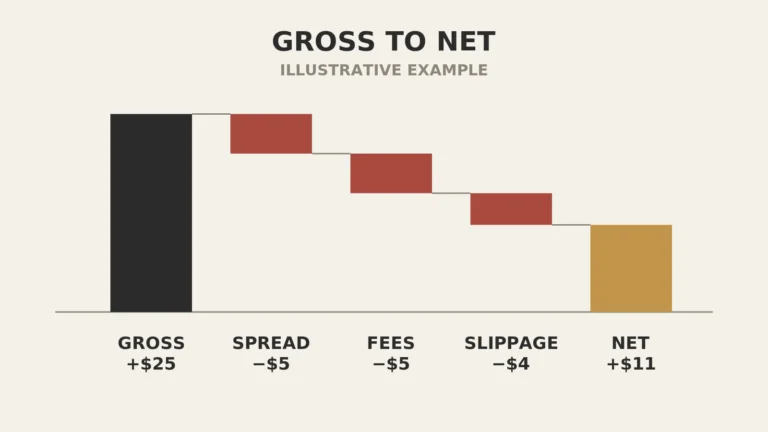
Execution quality also has a cost dimension. Bid-ask spreads, fees and the difference between expected and actual fills affect the net outcome. The trading costs guide explains how to calculate them without treating every price difference as a separate fee.
Which Order Type Fits the Execution Objective?
Begin with the constraint that matters most. If reducing exposure promptly is the objective, a market instruction may be more appropriate than a resting limit, but its final price is uncertain. If refusing a price beyond a specified boundary matters more, a limit order provides that restriction but can leave exposure unfilled.
If the order should not activate until a separate condition occurs, choose a supported stop mechanism and verify what type of order follows the trigger. A stop-market and a stop-limit do not provide the same protection. Neither is a substitute for a position-level risk budget.
Use this short execution review before sending an order:
- Identify the side and size. Specify whether the order buys or sells and the quantity involved.
- Identify the primary constraint. Decide whether immediacy, acceptable price or a trigger condition governs the instruction.
- Read the venue rules. Check supported order types, trigger references, order protections and time-in-force options.
- Check possible partial fills. Determine how remaining quantity and linked orders would be handled.
- Verify the outcome. Read the actual fill record, outstanding quantity and fees after submission.
For a broader trading plan, the Trading Plans & Journals Academy lesson explains why the intended action and its realized execution should be documented separately.
Common Order-Type Mistakes
- Assuming market means a fixed price. It seeks available liquidity and may trade across several levels.
- Assuming limit means a guaranteed trade. The price boundary can leave the order waiting.
- Confusing stop price with execution price. A trigger activates an order but does not fix the fill.
- Using a stop-limit without considering nonexecution. Price protection can leave the position open during a fast move.
- Ignoring partial fills. Actual exposure can differ from the submitted order quantity.
- Assuming all exchanges use the same rules. Trigger references, restrictions and supported instructions vary.
Check the Fill, Not Only the Order Ticket
Market, limit and stop orders solve different execution problems. Market orders favor immediate access to available liquidity. Limit orders define an acceptable price. Stop orders delay activation until a specified condition occurs, then rely on the mechanics of the resulting order.
After submission, verify the order state, quantity filled, average execution price, charges and any outstanding remainder. An order ticket records what you requested. The execution report records what the market actually did. Keeping both records makes later risk and performance reviews more reliable.
Key takeaways
- Market orders prioritize access to available liquidity, not price certainty.
- Limit orders control eligible prices but may remain unfilled.
- Stop prices activate an instruction and do not set the fill.
- Actual exposure reflects executed quantity, not requested quantity.
- Venue-specific protections can change how an order fills.
Objective: Define whether timing or price matters most.
Order: Choose the execution instruction and size.
Activation: Set the trigger and its reference if needed.
Boundary: Set a limit only when price control matters.
Duration: Check cancellation and partial-fill rules.
Reconcile: Compare fills, fees and remaining exposure.
Sources
- U.S. Securities and Exchange Commission, Understanding Order Types, updated August 2026. Market, limit and stop mechanics, price uncertainty and time-in-force instructions.
- U.S. Securities and Exchange Commission, Investor Bulletin on Stop and Stop-Limit Orders, updated August 2026. Activation and execution prices, stop-limit nonexecution and trigger references.
- Coinbase Help, Advanced Trade Order Types. Market protection, marketable limits, post-only conditions and partial execution.
- Binance Support, Different Order Types in Spot Trading, updated August 2026. Documented spot stop-market tolerance, conditional order behavior and partial fills.
Understanding order instructions is one part of a complete trading plan. Nobilora Free Lessons explain the related foundations of entries, exits and disciplined risk decisions.